Key Takeaways
- E-commerce photo editing entails stages such as corrections, cutout, retouching, and optimization.
- Cutout and clipping path will help create neat and consistent images in compliance with marketplace requirements.
- The color correction stage will give realistic product images and prevent returns.
- Batch editing will ensure the consistency of product images and their ability to load.
On all professional websites, an editing process is applied instead of a filter. E-commerce photo editing transforms product photos into web-friendly images that will attract possible buyers to the site. Below is what happens in the e-commerce photo editing process.
Color Correction First
Color correction is always the first step in the e-commerce editing process, since it involves fixing white balance, exposure, and contrast. This is the step that most affects returns. If the on-screen colour matches the real product, customers get what they expected and send less back.Background Removal and Clipping Paths
Next, the product is isolated from its background with a clipping path (a precise, hand-drawn outline) or masking for tricky edges like hair and fur. That lets editors drop the product onto clean white or custom background, the seamless, distraction-free look marketplaces like Amazon require, and the thing that keeps a catalogue uniform.Retouching
Retouching clears dust, fingerprints, scratches, and reflections, and brings out genuine detail and texture. The aim is an accurate, appealing product, not a misleading one, so it cleans up distractions while keeping the item true to life.Adding Shadows
A product cut onto white can look like it is floating. Editors add a natural drop or reflection shadow to ground it and add depth, a small step with an outsized effect on how real and premium the image reads.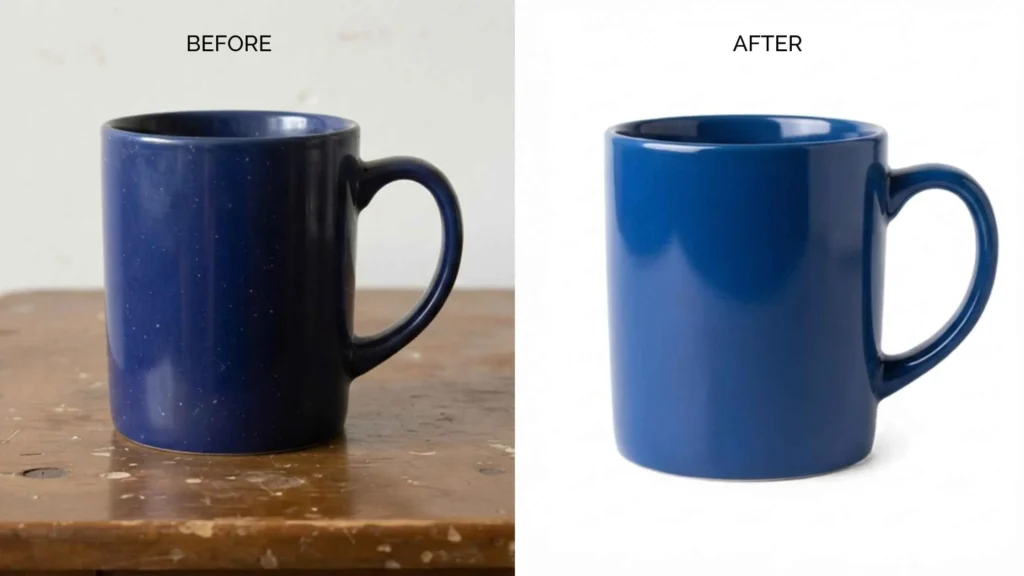
Resizing, Optimising, and Batch Editing
Finally, images are sized and optimised for the web: sized to how they are shown, compressed to load fast, and exported at consistent dimensions. For large catalogues, batch editing applies the same standards across hundreds of images at once, keeping an entire store consistent and quick.Why Consistency Is the Real Payoff
Individual edits matter, but consistency is the win. When every product shares the same background, lighting, crop, and colour, the catalogue reads as one professional store rather than a patchwork. That is exactly what a defined process delivers: the same standards on product one and product five hundred. Inconsistency, even between good photos, is what makes a store look amateur and quietly chips at buyer confidence, which is why a repeatable process beats any single impressive edit.DIY vs Professional
You can do all of this yourself for a handful of products. At scale, keeping every image consistent and on schedule becomes a production job, and that is where a service running the same process across the whole catalogue is usually faster and more consistent than in-house editing.
Frequently Asked Questions
What steps are involved in e-commerce editing?
Typically colour correction, background removal (clipping path or masking), retouching, natural shadows, and resizing or optimisation, often in batches for consistency across the catalogue.
What is a clipping path?
Why is colour correction so important?
Why do product images need shadows?
What is batch editing?
Various pictures are processed through the same process. Such processes include background editing, color correction, cropping, and resizing. It is more effective for a collection than for individual pictures.
Are product photos worth optimizing for online viewing?
Is professional e-commerce editing worth it?
How long does e-commerce editing take?
Can I mix DIY and professional editing?
Yes, and many stores do. A common split is quick, simple edits in-house and high-volume or complex work (clipping paths, retouching, batch consistency) to a service. Keep standards identical across both so a visible difference between in-house and outsourced images does not undo the benefit of either.